
The «Staff» section allows you to plan the working hours of your employees and allocate them across various projects. The tool helps avoid scheduling conflicts by visually displaying the availability of each specialist.
Where to find it
Go to the top menu of the system and select «Staff». Note: the section is available to users who have project planning visibility enabled in their access template.
How it works
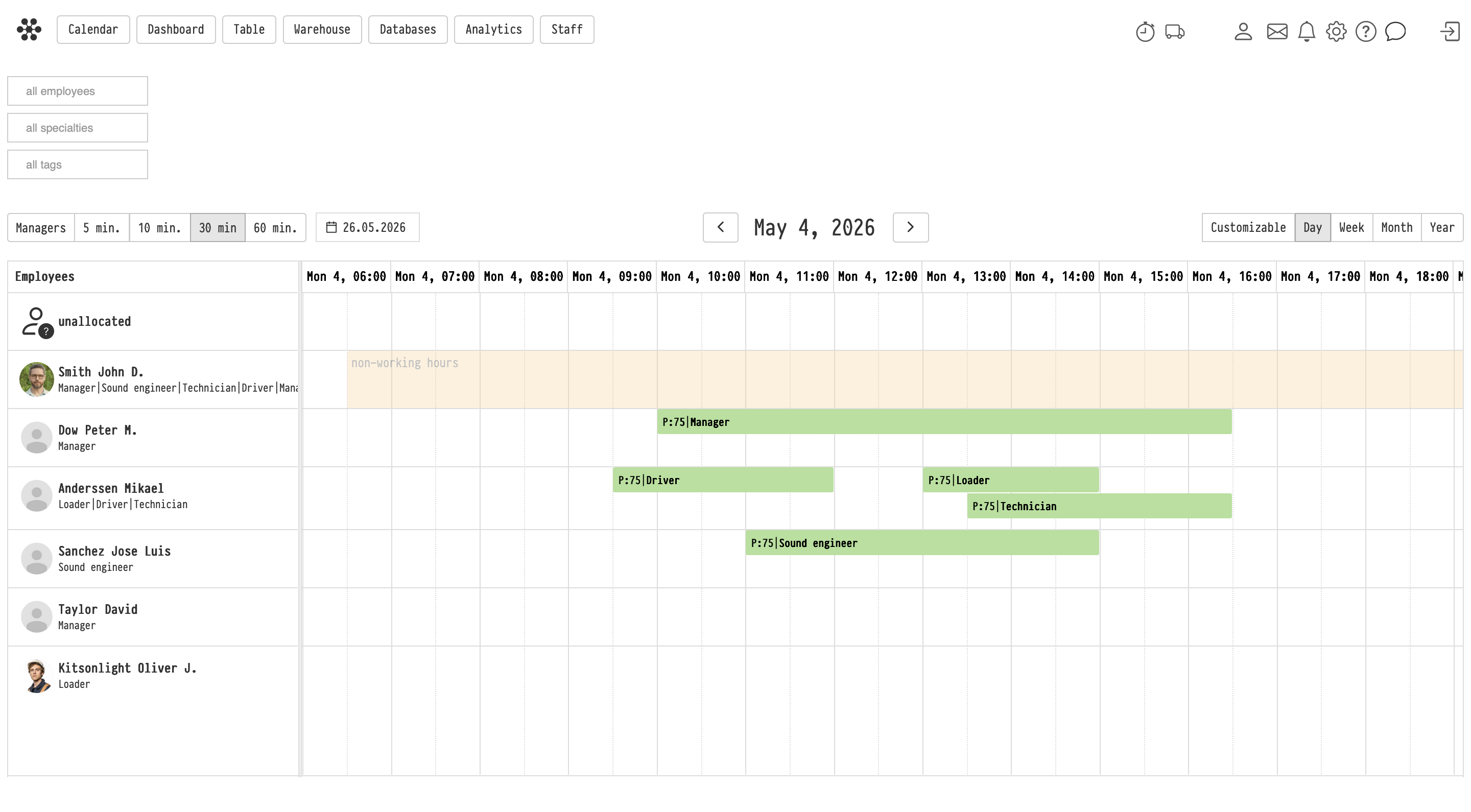
The section interface is presented as a Gantt chart, which has several timeline display modes: by hours (down to five-minute intervals), weeks, months, and for a full year.
-
The list of your employees is displayed on the left.
-
Under the name of each employee, their specialties are listed. If there are no specialties, the system will display a corresponding text.
-
By clicking on the avatar, you can go to the employee's card in the «Staff» database (opens in a new window).
Managing working hours
Hovering over a chart element brings up a tooltip with information about the project and the time involved.
-
Shift adjustment: By clicking on an element, you can adjust the work shift time directly in the modal window or change its duration by stretching the element to the right or left. The changes are automatically applied in the planning of the corresponding project.
-
Vacations and days off: Non-working time is pulled into the module from the Schedule. If an employee has a vacation scheduled, it will be displayed on the chart. This does not strictly block the ability to assign a person to a project, but serves as a visual hint of their unavailability.
Assigning to projects
You can add employees to projects directly from this section.
-
Select the required employee, highlight the free time and day.
-
In the menu that appears, select the «Assign to project» option.
-
A modal window will open where you need to select a project.
-
Assign the employee to the entire project or to a specific phase, leaving a comment if necessary. The data will immediately appear on the «Planning» tab of the selected project.
Filters
A filtering system is provided for convenient work with a large staff:
-
By specialty: allows you to keep on the screen only those employees who possess the selected skill.
-
By tags: allows you to group employees by departments or other categories (for example, keep only the sound department or warehouse on the screen). Tags are set in the user cards in the «Staff» database.
-
By employee: helps to track the working hours of a specific person to calculate their logistics when moving between several projects.
-
By managers: by default, managers are hidden from the chart. Enabling this filter displays managers whose engagement is tied to the entire project period, rather than individual shifts.
Key concepts
staff, gantt chart, work schedule, employee planning, vacation, non-working time, assigning to a project, staff filter, employee tags